
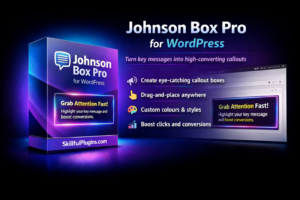
Johnson Box WordPress Plugin: The Easiest Way to Highlight Messages and Boost Conversions
If visitors land on your website and don’t understand your message within a few seconds, they leave. It’s that simple. When a user lands on your site, they tend to scan rather than read, so it’s most important that your message stands out immediately.
A Johnson Box can make the difference to whether the user stays or goes.
By placing a visually highlighted message at key points on your page, you can guide attention, clarify your offer, and increase conversions without redesigning your entire site.
What Is a Johnson Box in WordPress?
A Johnson Box is a highlighted content section designed to draw attention to a key message. In WordPress, a Johnson Box plugin allows you to create and place these attention-grabbing callouts anywhere on your site.
Typically, a Johnson Box includes:
- A bold headline
- A short benefit-focused message
- Optional call-to-action button
- Custom styling such as borders, colors, and shadows
Instead of letting important information get lost in paragraphs, a Johnson Box puts it front and center.
Why Use a Johnson Box WordPress Plugin?
1. Capture Attention Instantly
Your visitors will decide very quickly whether to read on or find something else. If your offer isn’t obvious, they won’t spend time looking for it.
A Johnson Box:
- Breaks the visual pattern of the page
- Creates contrast
- Directs the eye to your main message
This makes it easier for visitors to understand your value immediately.
What Is a Johnson Box?
A Johnson Box is a highlighted section placed near the top of a page — usually above the fold — that draws attention to your most important message.
* A bold headline
* A short value statement
* A key benefit or offer
* Sometimes a call-to-action
* A bold headline
* A short value statement
* A key benefit or offer
* Sometimes a call-to-action
2. Increase Conversions Without Redesigning Your Site
A lot of website owners will waste time redesigning their site to improve performance when all it may need is something that stands out. You will be surprised how a small change can impact performance.
With a Johnson Box WordPress plugin, you can:
- Make your products or services pop on your site
- If you have limited-time offers
- Increase email signups
- Drive clicks to sales pages
Get user to click and all without touching your theme layout.
3. Improve User Experience
Long pages can feel overwhelming. Johnson Boxes help by:
- Breaking up large blocks of text
- Creating visual structure
- Make your content easier to scan
Your goal is to keep your visitors engaged for longer and reduce bounce rates.
4. No Coding Required
One of the biggest advantages of using a Johnson Box WordPress plugin is simplicity.
Most plugins allow you to:
- Add boxes using shortcodes or blocks
- Customize colors, borders, and fonts
- Place them anywhere on posts or pages
- Make different designs across your site see what works
You get professional design results without writing CSS.
Where to Place Johnson Boxes for Best Results
Placement matters but test on all pages if needed here are some of the most effective locations include:
Above the fold
- Product pages
- Landing pages
- Service pages
After the introduction
- Blog posts
- Tutorials
- Reviews
Near conversion points
- Before pricing sections
- Above call-to-action buttons
- Near signup forms
The goal is to place the Johnson Box where visitors need clarity or a reminder of the value.
What Makes a High-Converting Johnson Box?
Not all highlighted boxes perform well. To get the best results, focus on these elements.
Clear, Benefit-Focused Headline
Avoid generic text. Focus on outcomes.
Instead of:
“Our Plugin Features”
Use:
“Create Attention-Grabbing Callouts That Increase Conversions”
Keep It Short
A Johnson Box should be quick to read so make it short only use:
- One headline
- One or two short lines
- Optional button
Too much text reduces impact.
Strong Visual Contrast
Your box should stand out from the rest of the page:
- Different background color
- Border or glow effect
- Plenty of padding
- Bold typography
If it blends in, it won’t work.
Include a Call to Action
If the goal is keep that user then add a button such as:
- Learn More
- Get Started
- Download Now
- Try the Demo
You will be turning attention into an action.
Who Should Use a Johnson Box WordPress Plugin?
Johnson Boxes are effective for:
- Plugin developers
- Affiliate marketers
- Bloggers
- Course creators
- SaaS businesses
- Membership site owners
- Online stores
In truth if you want to grab attention then using a Johnson box could make the difference to keeping that user or losing them.
Common Mistakes to Avoid
Using too many boxes
Don’t use boxes on every section of your site the information you a relaying has to stand out and if theres to many boxes nothing will stand out.
Don’t use boxes on every section of your site the information you a relaying has to stand out and if theres to many boxes nothing will stand out.
Writing vague copy
Focus on specific benefits, not general statements.
Focus on specific benefits, not general statements.
Poor placement
Burying a Johnson Box halfway down the page reduces its impact.
Burying a Johnson Box halfway down the page reduces its impact.
Overloading with text
Keep the message short and focused.
Keep the message short and focused.
SEO Benefits of Using Johnson Boxes
While Johnson Boxes are primarily a conversion tool, they can also support SEO by:
- Improving user engagement
- Increasing time on page
- Reducing bounce rate
- Making content easier to scan
If you can provide a good user experience, and clear structure helps achieve that search engines will look favourably on that page.
Choosing the Right Johnson Box WordPress Plugin
When selecting a plugin, look for:
- Easy placement via shortcode or block
- Full design customization
- Mobile responsiveness
- Lightweight performance
- Reusable templates
- No coding required
A good plugin will make your life easier and save you time by letting you create professional-looking boxes with easy placement on your site.
Why Johnson Boxes Still Work
Johnson boxes have been used in direct-response marketing for ages as they solve a fundamental problem: visitors don’t read everything.
A Johnson Box:
- Highlight the most important bits
- Reduces confusion
- Guides attention
- Reinforces your value
- Encourages action
It’s a small change that can have a big impact.
Final Thoughts
If your website visitors aren’t converting, the problem is often clarity. When your key message isn’t obvious, people leave before they understand what you offer.
A Johnson Box WordPress plugin helps you fix that by putting your most important message exactly where visitors will see it.
You don’t need a redesign. You don’t need custom development. Sometimes the simplest changes produce the biggest results.
If you want to capture attention faster, communicate value clearly, and turn more visitors into customers, adding a Johnson Box to your WordPress site is one of the easiest improvements you can make.
Elevate Your Vision
Join a community of elite creators today.
Ready to get started with Johnson Box?
Download it today and start using it on your WordPress site.