Auto Linker Pro for WordPress: Build a Stronger Internal Link Structure Automatically, Without the Manual Grind
Internal linking is one of the most consistently recommended SEO practices — and one of the most consistently neglected. The reason is straightforward: doing it properly requires reviewing every piece of content on your site, identifying relevant connections, and manually inserting links. For a site with dozens or hundreds of posts and pages, that is a significant undertaking that most site owners simply do not have time to complete.
Auto Linker Pro automates the entire process. You define the keywords and the target URLs once; the plugin scans your content and inserts the links automatically, across your entire site, in the background.
What Is Auto Linker Pro?
Auto Linker Pro is a WordPress plugin that automatically inserts internal links into your content based on keyword rules you define. When a keyword appears in a post or page, the plugin replaces it with a link to the URL you have specified — without any manual editing required.
The plugin works across all content types including posts, pages, WooCommerce products, and custom post types. It includes controls for link frequency, priority, exclusions, and geo-aware linking, giving you precise control over how and where links are inserted.
Why Internal Linking Matters for SEO
Internal links serve two critical functions in search engine optimisation. First, they distribute PageRank — the authority signal that search engines use to evaluate page importance — across your site. Pages that receive more internal links are treated as more authoritative, which improves their ranking potential.
Second, internal links help search engine crawlers discover and index content. A page that has no internal links pointing to it is harder for crawlers to find and may be indexed less frequently or not at all.
Beyond search engines, internal links improve user experience by guiding visitors to related content, increasing the number of pages they view per session and reducing bounce rates.
The challenge is that building a comprehensive internal link structure manually is time-consuming and difficult to maintain as a site grows. Auto Linker Pro solves this by handling the process automatically.
Key Features of Auto Linker Pro
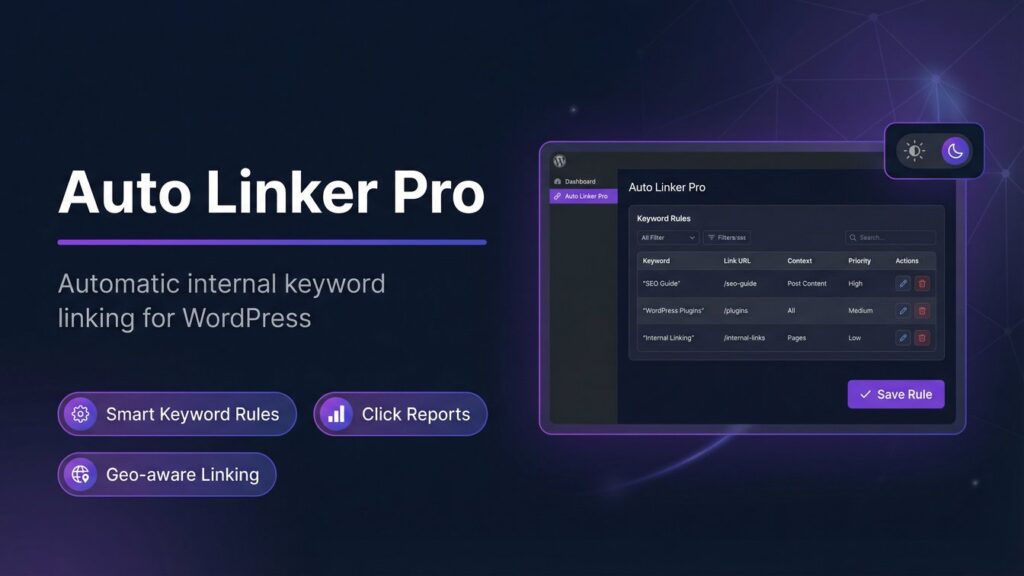
1. Smart Keyword Rules
The core of Auto Linker Pro is its keyword rule system. You create a rule by specifying:
The keyword or phrase to match
The target URL to link to
The maximum number of times the link should appear per post
The priority of the rule relative to other rules
Whether the match should be case-sensitive
Once a rule is saved, the plugin applies it automatically to all existing and future content. There is no need to edit individual posts — the links are inserted dynamically when the page is rendered.
2. Per-Keyword Link Frequency Controls
One of the most important aspects of internal linking for SEO is keeping anchor text natural. A keyword that appears twenty times in a post and is linked every time creates an unnatural pattern that search engines may penalise.
Auto Linker Pro allows you to set a maximum link count per keyword per post. You can specify, for example, that a keyword should only be linked once per post regardless of how many times it appears. This keeps your link patterns natural and within Google’s guidelines.
3. Post and Page Exclusions
Not every page on your site is a candidate for auto-linking. Contact pages, privacy policy pages, checkout pages, and other utility pages typically should not have internal links inserted into their content.
Auto Linker Pro allows you to exclude specific posts or pages from the auto-linking process with a single toggle in the post editor. Excluded pages are skipped entirely by the plugin, regardless of whether they contain matching keywords.
4. Geo-Aware Linking
For sites that serve audiences in multiple geographic regions, Auto Linker Pro includes geo-aware linking functionality. You can configure keyword rules to link to different URLs depending on the visitor’s location, allowing you to direct users to region-specific content, localised product pages, or country-specific landing pages.
This feature is particularly valuable for:
eCommerce stores with separate regional storefronts
Service businesses operating in multiple locations
Affiliate marketers with geo-targeted offers
Publishers with localised content editions
5. Click Reports and Analytics
Auto Linker Pro includes a reporting dashboard that tracks click data for auto-inserted links. You can see which keyword rules are generating the most clicks, which target pages are receiving the most internal traffic, and how link performance changes over time.
This data allows you to:
Identify which internal links are driving the most engagement
Prioritise high-performing keyword rules
Adjust link targets based on actual click behaviour
Demonstrate the value of internal linking to clients or stakeholders
Who Should Use Auto Linker Pro?
Auto Linker Pro is effective for any WordPress site with a substantial content library. It is particularly valuable for:
Bloggers and content publishers with large archives of posts that lack internal links
eCommerce stores that want to link product mentions in blog content to product pages
Affiliate marketers who want to ensure every mention of a product links to the affiliate offer
News and media sites publishing high volumes of content where manual linking is impractical
SEO agencies managing internal link structures for client sites
Site owners who have grown their content library faster than their internal link structure
Internal Linking Best Practices
Link to Deep Pages, Not Just the Homepage
The homepage of most sites already receives the most internal links. The pages that benefit most from additional internal links are deep content pages — individual blog posts, product pages, category pages — that may have few or no links pointing to them from other content. Auto Linker Pro is particularly effective at distributing link equity to these deeper pages.
Use Descriptive Anchor Text
Anchor text — the visible, clickable text of a link — tells search engines what the linked page is about. Descriptive anchor text that matches or closely relates to the target page’s topic is more valuable than generic text like “click here” or “read more”. Auto Linker Pro uses your defined keywords as anchor text, which means your rules should use phrases that accurately describe the content they link to.
Avoid Over-Linking Any Single Page
A page that receives hundreds of internal links from across your site may be treated as over-optimised. Distribute your internal links across multiple important pages rather than concentrating them all on a single target. Use the per-keyword frequency controls in Auto Linker Pro to manage link distribution and keep patterns natural.
Review and Update Rules Regularly
As your site evolves, some keyword rules may become outdated — linking to pages that have been removed, redirected, or replaced with better content. Review your Auto Linker Pro rules periodically to ensure all link targets are current and that the rules reflect your current content strategy.
Pricing and Plans
Auto Linker Pro is available in three tiers:
Free — Core auto-linking functionality with a limited number of keyword rules, suitable for getting started
Professional ($29.00) — Unlimited keyword rules, geo-aware linking, click reports, and advanced exclusion controls for a single site
Commercial ($99.00) — All Professional features plus the ability to use the plugin on client sites
The Professional plan is priced to be accessible for individual site owners while delivering the full feature set including geo-aware linking and click analytics.
Final Thoughts
Internal linking is one of the few SEO improvements that delivers benefits on two fronts simultaneously: it helps search engines understand and rank your content, and it helps users navigate to related content they are likely to find valuable.
The barrier for most site owners is not understanding — it is time. Manually reviewing and linking a content library of any significant size is a project that rarely gets done, which means most sites are leaving a straightforward SEO improvement on the table.
Auto Linker Pro removes that barrier by automating the process entirely. You define the rules once, and the plugin handles the rest — building and maintaining your internal link structure in the background, across your entire site, without ongoing manual effort.
Auto Linker Pro is a WordPress plugin that automatically inserts internal links into your content based on the keyword rules you define. It scans your content and dynamically links keywords to specified URLs, without manual editing.
Internal linking helps distribute PageRank across your site and aids search engine crawlers in discovering and indexing content, enhancing both page authority and search engine visibility.
Auto Linker Pro allows you to set a maximum link count per keyword per post, ensuring that keywords are linked naturally and within SEO guidelines to prevent penalties.
Yes, Auto Linker Pro allows you to exclude specific posts or pages from the auto-linking process using a simple toggle in the post editor.
Geo-aware linking lets you configure keyword rules to link to different URLs based on the visitor's location, which is useful for localizing content and targeting specific regional audiences.
Bloggers, eCommerce stores, affiliate marketers, news sites, SEO agencies, and any site owners with a large content library would benefit from Auto Linker Pro's automatic internal linking capabilities.
Auto Linker Pro includes a reporting dashboard that tracks click data for inserted links, helping you identify which links drive engagement and which keyword rules are most effective.
Yes, Auto Linker Pro works across all content types on WordPress, including custom post types, posts, pages, and WooCommerce products.
It's recommended to review and update your keyword rules regularly to ensure all link targets are current and align with your evolving content strategy.
Auto Linker Pro offers a Free plan with core functionality and a Professional plan at $29 with advanced features including unlimited rules, geo-aware linking, and click reports.
Ready to get started with Auto Linker Pro?
Download it today and start using it on your WordPress site.
We use cookies to ensure that we give you the best experience on our website. If you continue to use this site we will assume that you are happy with it.