Heading Styler for WordPress: Take Full Control of Every Heading on Your Site
Every heading on a WordPress site carries weight — visually, structurally, and in terms of SEO. H1 through H6 tags define the hierarchy of your content, signal relevance to search engines, and shape how readers navigate a page. Yet the default WordPress editor gives you almost no control over how those headings look once they are published. You can set the level and type the text, but styling — font, weight, colour, alignment — is handled by your theme, and changing it means either editing CSS or installing a page builder that adds far more complexity than the task requires.
Heading Styler is a lightweight WordPress plugin that solves this problem directly. It gives you a dedicated admin interface to fetch every heading from any post or page, apply precise styling controls, and save the changes — without touching your theme files or writing a single line of code.
What Is Heading Styler?
Heading Styler is a WordPress plugin that adds a standalone admin panel for managing the visual style of headings across your site. You select a post or page, click Fetch Headings, and the plugin retrieves every heading from that content and displays it in an editable list. From there, you can apply styling to individual headings or groups of headings, preview the result in real time, and save with a single click.
The plugin stores styles as inline CSS applied directly to the heading tags in your post content. This means the styles persist regardless of theme changes, are not dependent on any external stylesheet, and work with any WordPress theme or page builder.
Why Heading Styling Matters
Headings are the scaffolding of a web page. They tell readers what a section is about before they commit to reading it, and they tell search engines how the content is structured. A page with a clear, well-differentiated heading hierarchy is easier to scan, easier to navigate, and more likely to hold a reader’s attention.
The problem is that most themes apply a single consistent style to each heading level — the same font, the same weight, the same colour for every H2 across the entire site. That uniformity is appropriate for general content, but it is limiting when you need a specific heading to stand out, when your brand guidelines call for a different treatment in certain contexts, or when you are building a landing page where visual hierarchy is part of the conversion strategy.
Heading Styler gives you the tools to make those adjustments without disrupting your theme’s global styles. Changes are scoped to individual headings, so you can style one H2 differently from another without affecting anything else on the site.
Key Features of Heading Styler
1. Fetch Headings from Any Post or Page
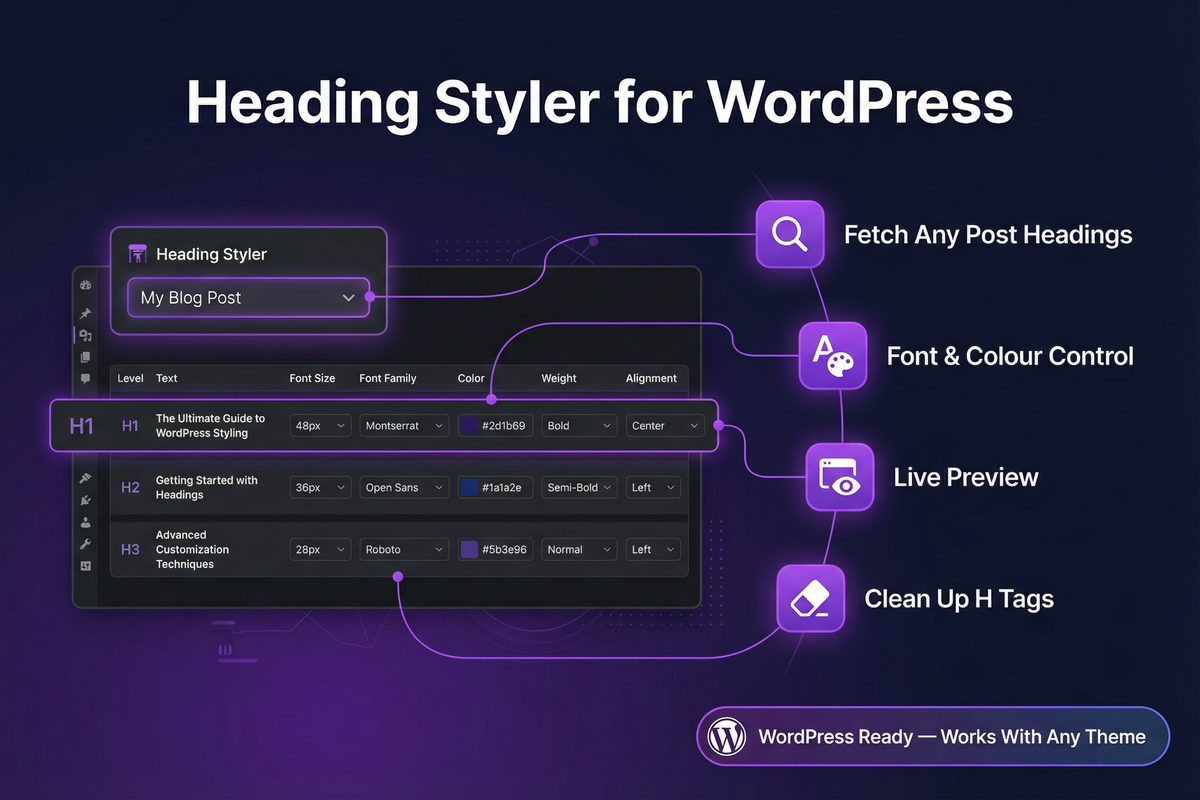
The plugin’s core workflow begins with a post or page selector. Choose a piece of content from the dropdown, click Fetch Headings, and Heading Styler retrieves every heading in that content and displays it in a structured list. Each heading shows its level (H1–H6), its text, and the current styling applied to it.
This approach gives you a complete view of a page’s heading structure in one place — something the WordPress block editor does not provide. You can see at a glance whether your heading hierarchy is logical, whether any levels are overused or missing, and where visual adjustments are needed.
2. Font Size Control (Free)
The free version of Heading Styler includes font size control. You can set a precise pixel size for any heading, giving you the ability to adjust the scale of individual headings without editing your theme’s stylesheet. This alone resolves one of the most common heading complaints: a theme’s default heading sizes that do not match the visual weight you need for a particular piece of content.
3. Heading Level Conversion (Pro)
Heading Styler Pro allows you to change the heading level of any heading directly from the admin panel. If a post was written with H3 tags where H2 tags should be, or if an H1 is being used where an H2 is more appropriate, you can correct the hierarchy without going back into the post editor and manually changing each tag.
This feature is particularly valuable for sites that have imported content, inherited posts from a previous author, or accumulated structural inconsistencies over time. Correcting heading hierarchy is a recognised SEO improvement, and Heading Styler makes it a straightforward task rather than a manual editing exercise.
4. Text Colour (Pro)
Heading Styler Pro includes a colour picker for each heading. You can set any heading to any colour, allowing you to create visual emphasis, match brand colours, or differentiate sections of a long-form post without relying on your theme’s limited colour options.
5. Font Weight and Style (Pro)
The Pro version gives you control over font weight (Normal, Bold) and font style (Normal, Italic), applied per heading. This allows you to create typographic contrast between headings at the same level — for example, making a section subheading italic to distinguish it from the main section heading above it.
6. Text Alignment (Pro)
Heading Styler Pro adds alignment control for each heading: Left, Centre, or Right. This is useful for landing pages, feature sections, and any layout where centred or right-aligned headings are part of the visual design.
7. Font Family Selection (Pro)
The Pro version includes a font family selector with eleven options, including system fonts and Google Fonts. You can apply a different typeface to individual headings, allowing you to mix a serif display font for section titles with a sans-serif body font for subheadings — a common typographic technique for adding visual interest to long-form content.
8. Live Preview
Every styling change in Heading Styler is reflected in a live preview panel before you save. You can see exactly how a heading will look with your chosen font, size, weight, colour, and alignment before committing the change to your post content. This eliminates the trial-and-error of editing, saving, and refreshing the front end to check the result.
9. Clean Up H Tags
Heading Styler includes a Clean Up H Tags function that strips all inline styles from the headings in a selected post or page in a single click. If you want to reset a page’s headings to their theme defaults, or if you are starting a restyling exercise from scratch, this function removes all previously applied styles cleanly without requiring manual editing.
Who Should Use Heading Styler?
Heading Styler is suited to any WordPress site owner who wants precise control over how headings look without the overhead of a page builder or custom CSS. It is particularly valuable for:
Content publishers who manage large archives and need to correct heading hierarchy across multiple posts without opening each one in the editor.
Landing page builders who need headings that deviate from the theme’s global styles — different sizes, weights, or colours — for specific conversion-focused pages.
Bloggers and writers who want to add visual variety to long-form posts without learning CSS or installing a heavyweight design plugin.
Site owners who have inherited a WordPress site with inconsistent heading structure and need a practical tool for auditing and correcting it.
SEO practitioners who understand that heading hierarchy is a structural signal and want a reliable way to enforce correct H1–H6 usage across their content.
Pricing and Plans
Heading Styler is available in two tiers:
Free — Fetch headings from any post or page and adjust font size. Suitable for basic heading size adjustments without any cost.
Pro ($17.00) — The full feature set: heading level conversion, text colour, font weight, font style, text alignment, font family selection (11 options), live preview, and Clean Up H Tags. A one-time purchase for a single site.
The Pro plan is priced to be accessible for individual site owners and bloggers while delivering the complete set of controls needed for serious heading management.
Final Thoughts
Heading structure is one of those details that is easy to overlook and difficult to fix at scale. Most WordPress site owners either accept their theme’s default heading styles or spend time in the block editor making individual adjustments that are slow, inconsistent, and hard to audit.
Heading Styler gives you a dedicated tool for the job. Fetch the headings from any piece of content, apply the styles you need, preview the result, and save — all from a single admin panel. The free version handles font size. The Pro version gives you the full range of typographic controls that a well-structured, visually polished site requires.
Ready to take control of your headings?
Download Heading Styler today and start styling your WordPress headings the right way.
Heading Styler Pro allows you to customize the appearance of headings on your WordPress site by adjusting fonts, colors, sizes, weights, and alignment.
Yes, Heading Styler Pro is designed to work with any WordPress theme by fetching and customizing headings from any post or page.
The free version allows you to fetch headings and adjust their font sizes.
The Pro version unlocks full styling controls, enabling adjustments to fonts, colors, sizes, weights, and alignment.
Yes, Heading Styler Pro includes a live preview feature that lets you see changes in real-time within the admin interface.
Install it like any other WordPress plugin: download, upload to your 'Plugins' directory, and activate from the WordPress dashboard.
Yes, Heading Styler Pro can be used across multisite WordPress installations, offering consistent styling control.
Yes, Pro users have access to prioritized customer support to assist with any issues or questions.
Heading Styler Pro is optimized for performance and should have a minimal impact on your website's loading speed.
You can upgrade to the Pro version directly from within the plugin or the official website, where you can follow the purchase instructions.
Ready to get started with Heading Styler?
Download it today and start using it on your WordPress site.